Genealogy from the perspective of a member of The Church of Jesus Christ of Latter-day Saints (Mormon, LDS)
Tuesday, November 5, 2019
The Challenge of Multiple Online Family Trees: Part One Introduction
When I point out either to classes or individuals the advantages of having record hints from all of the major online genealogy database websites, the one most common response is to object to having multiple copies of their family tree information. This concern is often coupled with a complaint about how the information in the FamilySearch.org Family Tree is "changing" all the time. Interestingly, the two issues are obviously related. The addition of historical sources to unsourced family trees inevitably leads to changes in the unsourced data. So the real issue is whether or not the advantage of having the automated record hints outweighs any concerns about either changes or the difficulty in "maintaining" multiple family trees on multiple websites. For this particular post, I am going to limit my comments to only four online family tree websites: FamilySearch.org, Ancestry.com, MyHeritage.com, and Findmypast.com. All four of these websites have record hint technology coupled with a family tree. Two of those websites, Ancestry.com and MyHeritage.com, provide a pathway for members of The Church Church of Jesus Christ of Latter-day Saints to synchronize all or part of the data generated by those record hints with the FamilySearch.org Family Tree.
I intend to go into the details of the synchronization process for both Ancestry and MyHeritage in later posts in this series, but for now, I will simply say that the ability to synchronize the information between family trees is fundamentally the answer to the issue of maintaining and benefiting from multiple family trees. But even absent an efficient way to synchronize data, the record hints are worth the extra work involved in maintaining more than one family tree.
At this point, it is important to point out that many of the same people who question the need for multiple family trees know little or nothing about the resources provided by the four online programs and how those resources in the form of vast collections of records differ from website to website. The collections maintained and added to by each of the four websites are substantially different and each of the websites has its own unique records not available on the other websites. For example, MyHeritage.com has an integrated, extensive, entirely indexed, and searchable collection of newspapers that is rapidly growing. MyHeritage Record Match discoveries in newspapers are included in the record hints automatically supplied to LDS users of the program. MyHeritage is the only website of the four that presently includes newspaper matches as part of its LDS Account offerings. Both Ancestry.com and Findmypast.com have separately charged subscription newspaper websites. Likewise, both Ancestry.com and Findmypast.com have collections that are not available on MyHeritage.com. Granted, that these advantages are only available to members of the Church and those without an LDS Account will have to pay for all of the subscription services.
One of the core issues with multiple family tree websites is the added burden of remembering logins and passwords. This is a universal background burden on all online activities. Of course, you can pay a subscription service to maintain a database of all your passwords, but then you still have to remember the service's login and password and when you change a password you still have to tell the service about the new password. If you are worried about your passwords being hacked, it might occur to you that it would be harder to hack multiple passwords than hack the server for the system that is helping you remember all your passwords.
I believe that the main objections to multiple family tree websites arise out of a lack of basic computer skills. Many people are not comfortable with the multiplicity of the online experience. For example, I taught a class about online ebook sources today that included a number of extremely popular and well-known websites. Very few of the websites were familiar to those attending the class and most were "overwhelmed" at the number of places to look for genealogically significant ebooks online even when the number of websites was really quite a vanishingly small representative of all the possible online sources.
As you can tell from what I have already written, maintaining multiple online family trees can be a challenge, but the benefits are substantial and when taken in the perspective of working with dozens or even hundreds of different programs and websites, not as significant an issue as it might initially appear to be.
Stay tuned for additional posts on this subject.
Monday, November 4, 2019
Experiencing the Digital Divide
The digital divide is the gulf between those who have ready access to computers and the Internet and those who do not. A recent Pew Research Center study found that about 10% of Americans do not use the internet. However, the percentage for people over the age of 65 was at 27%. Many, if not most, of the people who are interested in genealogy, fall into that age group and sadly, the percentages ring true. Here is a quote from the article entitled, "10% of Americans don’t use the internet. Who are they?"
For instance, seniors are much more likely than younger adults to say they never go online. Although the share of non-internet users ages 65 and older has decreased by 7 percentage points since 2018, 27% still do not use the internet, compared with fewer than 10% of adults under the age of 65. Household income and education are also indicators of a person’s likelihood to be offline. Roughly three-in-ten adults with less than a high school education (29%) do not use the internet in 2019, compared with 35% in 2018. But that share falls as the level of educational attainment increases. Adults from households earning less than $30,000 a year are far more likely than the most affluent adults to not use the internet (18% vs. 2%).As is indicated, these numbers vary not only by age but also by the economic level of the populace. Members of The Church of Jesus Christ of Latter-day Saints are continually reminded of their duty to seek out their ancestors and take the names of their ancestors to the temples. The group who spends the most time involved in temple work is exactly the same group of people who are the most challenged by technology.
Back in 1975, the first personal computer was introduced, the MITS Altair 8800. See "Personal Computer History: 1975-1984." Also, Steve Jobs and Steve Wozniak introduced their Apple1 computer in 1976. If you are 65 years old today, you were already 21 years old back in 1975 and probably through with your formal education and unless you already had an interest in or contact with computers and you were more than likely not interested in the new developments. I was an exception to this because of my early contact with the University of Utah mainframe computer during the late 1960s and early 1970s. The first Macintosh computer was introduced by Apple in 1984 and by that time today's over 65 group was already into their 30s and the likelihood of taking an interest in the new technology had decreased even more.
Just think about typing. Fortunately, unlike many of those in my age group, I learned to type in high school but before that one typing class, I had almost no contact with typewriters or typing. I see the effects of this lack of early instruction almost every time I sit down with an older person and try to help them with their computer and genealogy skills. We assume that children today are taught "keyboarding" skills and in many cases that is a true assumption, but there are still many schools that do not have universal requirements that children learn to type. But a lack of typing skills is a real obstacle to learning the computer skills necessary to take advantage of the technological advances in genealogical research.
Another important fact about genealogy and timeline of the development of personal computers is the fact that women are overwhelmingly more involved in genealogy than are men and it was even less likely that women would become involved with the new computer technology more than 44 years ago than they are today. There are notable exceptions but unfortunately, there were few men back then who viewed computers as an area of interest for women. Again, I was an exception to this rule and made sure that my five daughters were not just computer literate but could use computers professionally.
Interest in technology and the skills to use it effectively does not imply an interest in genealogy. Most of the current promotional efforts by the large genealogy companies assume that the target audience is technologically savvy if not advanced. You only need to look at ads for genealogical DNA testing to see this assumed interest and expertise. Another example of this assumption is the FamilySearch emphasis on technologically advanced Discovery Centers. This emphasis is interesting to me when I reflect on the fact that I spend a considerable amount of my time helping older people with their logins and passwords.
If you add up the obstacles presented to the older population, it is obvious why there is a digital divide preventing many older people from becoming more involved in genealogical research.
Tuesday, October 29, 2019
Are we really cousins?
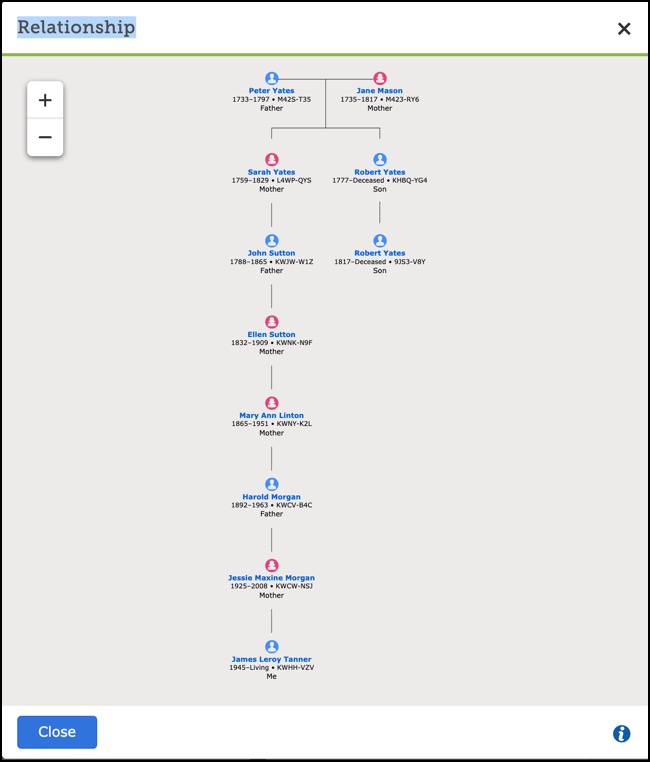
One of the new popular apps from FamilySearch is Relatives Around Me app available on the FamilySearch Tree app for mobile devices. It works when there are other people using the app in the same limited area. The app is both interesting and entertaining. But am I really related to all those people who show up on the app? The other day at the Brigham Young University Family History Library, one of the patrons wanted to know if we were related and yes, we were. In fact, quite closely and easily verified. But what about remote relationships such as the one illustrated above?
The basic premise of the app is that the relationships shown in the FamilySearch.org Family Tree are accurate. Sorry, but this is not always the case. If I look closely at the pedigree shown above that I got by clicking on View-My-Relationship, I find that one of the links has only one source and was born in a place that is relatively distant from the place where his father is listed as living. I would assume that these people were not related. Additionally, I find additional sources listed for the person known as Robert Yates and he was born in Oswaldtwistle, Blackburn, and none of the other listed children or his parents were born in Blackburn.
This pedigree is basically an invitation to do some research. Its value showing an accurate relationship is minimal and very likely inaccurate. Before you start embracing your newly discovered relatives, I would do a little bit of basic research to see if the links are logical, consistent, and supported by the sources cited. Of course, if there are no sources and the relationship is faulty, then ignore the connection.
Thursday, October 24, 2019
How Ordinances Ready has changed my way of doing research
In the past, there have been a number of programs designed to search through the FamilySearch.org Family Tree for "temple opportunities." The generic term for these programs is "ordinance crawlers." Most of these programs simply looked for individuals with green temple icons. Some of them were and are a bit more sophisticated and provided additional information about the entries in your portion of the Family Tree that included incomplete temple work. Over the past few years, I have used many of these programs and some of them are extremely valuable in assisting in genealogical research. About a year ago, FamilySearch introduced its own program, Ordinances Ready, that searches on multiple levels to find your own temple opportunities.
The initial reactions of genealogists to the program were very mixed. I wrote about how the program was changing the FamilySearch Family Tree in a blog post entitled, "A New Paradigm for the FamilySearch Family Tree." Moving from third-party apps to an integrated one initiated a significant change in the process of "finding a name to take to the temple." From my own observations and from the accounts of others, in many Wards and Stakes, there has been a significant increase in both temple activity and by members taking family names to the temples although the actual increase is not generally available.
But the introduction of the Ordinances Ready app has had a more far-reaching change on the way I do research in the Family Tree. I wrote about this change in a post entitled, "Using the Ordinances Ready App to Find Research Opportunities." Now, after a year or so of taking advantage of this new venue for finding people who need ordinance work, I thought it was time to discuss an update.
The person highlighted in my early post was George Orr GMZP-9Q4. The Ordinances Ready app showed that his baptism and confirmation were available. A recent check shows that someone performed both for him shortly after my post was put online. But what about the other obviously available ordinances for others that were closely related to George Orr? He was the husband of one of my cousins, therefore, my opportunities to perform ordinances his family as opposed to those who are more directly related to me are limited. Also, he was supposedly born in 1784 and the place of his birth was listed only as Pennsylvania, United States which also placed some practical limitations on additional research opportunities. He also has no sources attached.
At this juncture, I need to point out that George Orr's name had already been submitted to the temple by someone else. Ordinances Ready had found him in the Temple List. This means that without the Ordinances Ready app, I would not have had the opportunity to perform his baptism and confirmation. Those ordinances would simply have gone into the queue and waited for his name to come up among all the others waiting for their ordinances to be done. As a matter of fact, there are still two of his ordinances left to be done. But absent being found by Ordinances Ready, it may be a long time before those remaining ordinances, shared with the Temple in November of 2018 are done. Shared male endowments are apparently taking a very long time to be completed.
How many other ordinances are there waiting to be performed for George Orr and his family? How many for his wife's family? The Family Tree gives us a simple way to see what those opportunities look like. First, I need to view George's own family tree segment.
No one has yet found his parents.
Absent his marriage to my relative, he would have been absent from the Family Tree or a "floater," a person with no attachment to anyone in the Family Tree. There are a number of people in the Family Tree in his descendancy line from one of his children but very little work has been done on these descendants.
FamilySearch has found a large number of Record Hints for this family. Choosing one of these descendants randomly, I find Hiram Hyte Dewees with no spouse and no children in the Family Tree but with some Record Hints. One Record Hint is a census record that shows him and his wife and seven children. Due to the 110 Year Rule, I cannot do the ordinances for this family without permission but I might add them to the Family Tree but since they were all born within the last 110 years, I do not know if they are living and even if I add them, I would be the only person who could see them. So, I elect to add the wife but not the children at this time and wait to see if someone else who is more closely related finds them with the sources I have already added. On the other hand, if I do add them, even if I have to mark them as living, I could do some research and see if they are deceased. But, of course, the 110 Year Rule would still prevent me from doing the ordinances.
Hmm. By adding one child's name, James C. Dewees, I find that he has a Death Record. Even though I cannot do the ordinances, he will still appear in the Family Tree with a green temple icon and someone who is related can now find him and do the ordinances.
If I bang away at some of my missing ancestors in the 17th and 18th Centuries, I can spend literally years before I find anyone to add to the Family Tree. By using the Ordinance Ready app as a research tool, I can find a family with dozens, perhaps hundreds of opportunities.
Now, what do I do with all these names? Obviously, I cannot do all the ordinances myself. So, I share them with the temples. All of them. If my family members need names to take to the temples, they can use the Ordinances Ready app to find these shared names. I can do what I do and that is finding new people for the Family Tree.
Think how many more ordinances are waiting from just this one family.
Wednesday, October 23, 2019
Welcome to the FamilySearch Community
![]() |
| https://community.familysearch.org/s/ |
![]() |
| https://community.familysearch.org/s/workgroup/Workgroup__c/Default?tabset-04f8c=2 |
![]() |
| https://community.familysearch.org/s/ask-a-question |
All in all, the Community section of the FamilySearch.org website is another of the hidden gems.
Tuesday, October 8, 2019
Both Sides of the Veil
During talks and presentations of the General Authorities of The Church of Jesus Christ of Latter-day Saints, it has become common recently to speak of doing missionary work "on both sides of the veil." This is extraordinarily well highlighted by a presentation given by President Russell M. Nelson. I am personally surrounded by people, both in and out of the Church who have little or no interest in participating in the redemption of the dead. I often feel a deep sadness because of the attitude of those around me towards this great work. Here is a short video of the presentation.
President Nelson' Grandfather's Visit from the other side of the Veil and Family History Work
The tools have been provided for us to become a part of this great work "on both sides of the veil." If you have not yet become involved, I suggest that you begin today and start by making use of the Ordinances Ready app on both iOS and Android devices as well as available in the FamilySearch.org Family Tree program for desktop computers and tablets.
![]() |
| https://www.familysearch.org/blog/en/ordinances-ready/ |
Begin today!
Tuesday, October 1, 2019
FamilySearch.org Family History Activities Pages
The FamilySearch.org Family History Activities page is usually available from a link on your custom designed start-up page. You can go directly to the page by using this URL: https://www.familysearch.org/discovery/
The page presently contains a dozen activities some of which are similar to and somewhat modified from the activities in the FamilySearch Family Discovery Centers such as the one on the first floor of the Family History Library in downtown Salt Lake City, Utah. Some of the activities have been individually featured over the past months on the FamilySearch.org website.
Because most of my direct line ancestors joined The Church of Jesus Christ of Latter-day Saints and crossed the Plains to the Salt Lake Valley, some of these activities have a lot of responses for my family. For example, there are twenty ancestors who appear in the Nauvoo activity although there are a few surprises.
It also looks like I have twenty early missionaries but I think the activities stop at twenty. I think it is an interesting experience to explore all of these discoveries. Take some time to work through and you might have your own surprises.
Subscribe to:
Posts (Atom)