Genealogy from the perspective of a member of The Church of Jesus Christ of Latter-day Saints (Mormon, LDS)

Wednesday, April 24, 2019

The Family History Guide adds the FamilySearch Memories App

https://www.thefhguide.com/blog/family-tree-memories-app-and-the-family-history-guide/?utm_source=The+Family+History+Guide+Association+Blog+Main&utm_campaign=71aa1a8b04-RSS_EMAIL_CAMPAIGN&utm_medium=email&utm_term=0_41be9f9d3a-71aa1a8b04-283099673
Here is the notice from The Family History Guide about the addition of instructions for the FamilySearch Memories App.
A few weeks ago we announced a new Project for the Family Tree app on The Family History Guide website. Now it’s time to introduce the Project for the sister app: Family Tree Memories. You can find this Project at the bottom of the FamilySearch learning path, in the top menu. 
Here’s a summary of the Goals in the Memories App Project:
As you would expect, there are Choices, Steps, Exercises, and Online Tracker entries for each of these Goals, as well as helpful screenshots to guide you through tasks.

We hope you enjoy the new Memories App Project in The Family History Guide. It’s a great companion to the Family Tree App, and it makes creating and uploading memories literally a snap!

Does Anyone Get Lost in the FamilySearch Family Tree?


I have been noticing that many users of the FamilySearch.org Family Tree agonize over the issue of removing a wrongfully attached child or spouse. The situation is usually that the children or one or both parents listed in a family are not supported by any records or there are records, such as a census record, that do not show them as being part of that particular family. As shown by the image above, there is always the option of removing or replacing any individual in the Family Tree. But when should you do this?

The example above is not one of those removal or replacement issues. There are several sources listed supporting the relationships. But if I work my way out on this particular line, I will inevitably run into the issue of whether or not an entry is supported by the existing sources listed in the Family Tree. Here is an example.


Samuel Linton (b. 1775) is shown as married to Margaret McBride (b. 1773). Samuel is shown as born in County Down, Ireland and his wife, Margaret, is shown as being born in County Tyrone, Ireland.  Tyrone and Down are about 100 miles apart. The only source cited for Samuel is a Family Group Record that cites "Family Records" as a source. Here is the Family Group Record (FGR).


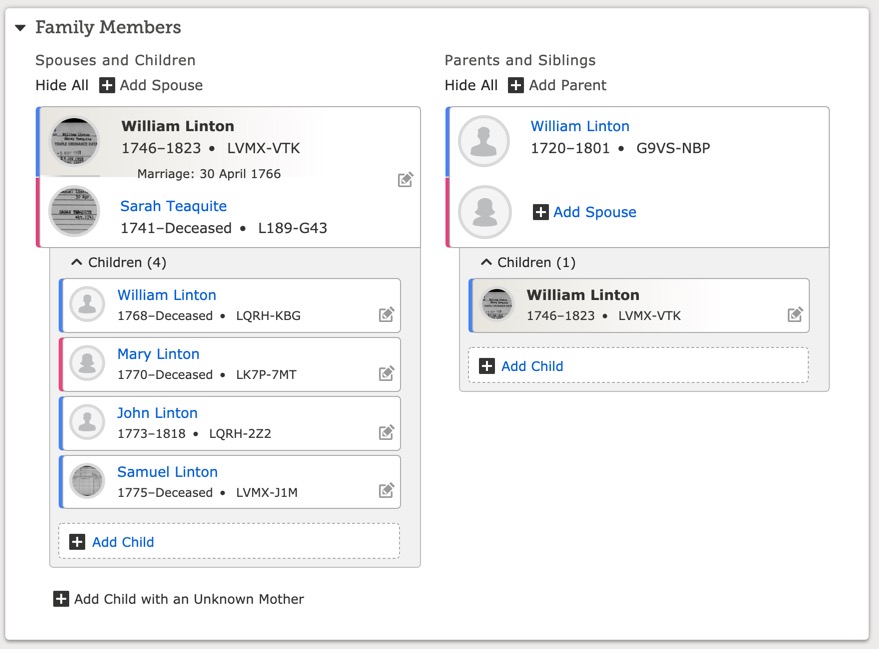
However, the birth date listed for the Samuel Linton on this FGR is about 1769. There is nothing that shows how his parents William and Sarah got together while living so far apart in the mid-1700s. William Linton (b. 1746, d. 1823) is married to Sarah Teaquite (b. 1741). William is supposedly born in County Down and Sarah is born in County Tyrone. Their four children are shown as follows:


The first child listed is supposedly born in County Derry, Ireland. The sources listed for this William Linton (b. 1768) are two marriage records showing he married Jane Mathers 30 January 1794 in Philadelphia, Philadelphia, Pennsylvania.

I could go on and on, but it appears that there are no records that support any of these marriages or child/parent relationships. But what happens if I start detaching all these people from these families? What if all of the temple ordinances have been done? (Which they have).

Well, it turns out that my direct line ancestor is the Samuel Linton (b. 1775) and there are no sources at all identifying his parents. So what if I simply detach him from this family? What about the ordinances?

Whether or not the ordinances were done for the wrong family configuration does not affect the validity of the personal ordinances done such as baptism etc. The only issue is that the sealing ordinances we need to be redone if the correct people are finally identified. If I were to detach Samuel Linton (b. 1775) from his parents as shown, then these parents would still be in the Family Tree and available if someone were to find a supported relationship. In short, no one is every "lost" in the Family Tree, an individual may not be attached to anyone or a short or long family line may not be attached, but these bits and pieces are still out there waiting for research that can show how they should be attached. If these people's individual ordinances have been done, then the ordinances are valid, but any invalid sealing ordinances would have to be redone if the correct relationships were identified. By the way, if a child is sealed to the wrong parents, the child is still technically sealed. The sealing to parents ordinance is like baptism, it is an individual ordinance. But almost always, the sealing ordinance will be redone when the correct parents are identified.

What about the mess I outline above? Well, from my standpoint, this line ends with William Linton (b. 1801) in Ardstraw, Tyrone, Ireland. Why don't I detach him from his parents as shown? The real reason is simple. I don't have any records showing anything different. So until I can find a record showing who William's parents actually were, I can either choose to detach the unsupported ancestors or not. But if I did detach them and they were later shown to be correct, they would still be out there in the Family Tree ready to be re-attached and their ordinances would still be done.

Sunday, April 21, 2019

Can there really be that many birth names on the FamilySearch Family Tree

Names blurred out 
Why do some of the entries in the FamilySearch.org Family Tree have so many entries for an individual's "Birth Name?"

The answer is somewhat complex, but before I get into the issue of multiple birth names, it is important to understand what the "birth name" should be and where it should be entered. The birth name should be the name given at birth. Hmm. This almost sounds like a new rule to add to my list. But this rule needs to be qualified to actually work. Here is the next part of the rule: If there is no birth record available, then the "birth name" used is the name appearing on the earliest known record or source. When I say "earliest" I mean in time. So, if the only record of the person's name was on a grave marker, then that would be the earliest known record.

What if the name on the birth record is wrong? Again hmm. If it is the name that is on the earliest known record why would you conclude that it was "wrong?" What if the person changed their name? What if the person didn't like the name and didn't ever use the name? All that and more. Back to the rule: The birth name is the name given on the earliest known record. If there are subsequent names in subsequent records then they should all be listed as Alternative Names or Nicknames. What if the only name recorded is Betty or Betsy? Can we assume that the person's name was Elizabeth? No. Not unless there is a record showing that the name was recorded as Elizabeth in the earliest known document.

Now, what about all these "Birth Name" entries on the FamilySearch.org Family Tree? These entries are merely a default way of recording all the differences in all the entries made for that person over the long years since people started giving records to FamilySearch and all of its predecessors. It is up to you figure out which one was the one used in the earliest record. But what if there are no sources citing records? Then all the names may be alternate spellings or even the names of other people. If alternate names show up in records and are added as sources to the Family Tree then add the records as "Alternate Names" and designate which record or document produced the alternate names.

IN EVERY CASE, THE ONLY "BIRTH NAME" THAT SHOULD BE SHOWN OR RECORDED IS THE ONE THAT IS ENTERED IN THE "NAME" SECTION OF THE VITALS SECTION OF THE PERSON PAGE.

All other names, whatever their origin, should be recorded in the Other Information Section as Alternative Names. If you do not have a source for the alternative name then explain where you got it or that you made it up but don't call it a birth name.

What do I do with the long lists of Birth Names? I delete them as duplicates unless they are supported by a record and then I change the designation to reflect why the alternate name exists.

Saturday, April 20, 2019

Exploring Genealogy Series #3: Relative Finder


Exploring Genealogy Series #3 Relative Finder

You will probably notice that this is the third video in this series. The reason is that I am adding videos to my blog posts on both Genealogy's Star blog and this Rejoice, and be exceeding glad... blog. I have decided that since I spent so much time learning how the video programs, such as Adobe's Premiere Pro 2019 work, that I would take advantage of my new skills and turn blog posts into videos.

Of course, I will still have videos in the form of webinars from the Brigham Young University Family History Library and they will be posted on the Library's YouTube Channel. In a sense, I guess I am competing with myself, but I am sure all of you out there can sort things out. But just think, I might do as many videos as I have blog posts. Maybe YouTube will collapse under the weight of all my videos.

By the way, I am also doing videos for The Family History Guide. See if you can guess which ones they are. I will give you a hint, they have a computer-generated narrator voice.

Stay tuned as I always say. 

Thursday, April 18, 2019

Exploring Genealogy Series #1 The Virtual Pedigree


Exploring Genealogy Series Virtual Pedigree

I am starting a new series of blog posts with videos called the Exploring Genealogy Series. For the time being, I am posting these videos on my own YouTube Channel. Please take a moment to subscribe to my YouTube Channel. Here is the link:


I have found that I can produce a video both easier and more quickly than I can write a blog or do a slide presentation. Watch for this. 

Tuesday, April 16, 2019

An Updated Look at the FamilySearch Solutions Gallery


Securely hidden at the very bottom of the pages of the FamilySearch.org website is the revamped Solutions Gallery. FamilySearch changed its method and criteria for including "apps" in the Solutions Gallery with the transition from the old "App Gallery." Almost since the beginning of the world of personal computers (I bet you haven't heard that term in a long time) programmers have been hiding surprises in their code commonly called "easter eggs." The Solutions Gallery isn't exactly hidden, but it may as well be. For example, in this initial view, there are three featured apps in each category. Each featured app has a five-star system for ranking. Out of the 33 apps (including duplicate entries) there are 13 that have no ranking at all. In addition, the app with the larges number of "reviews or rankings" has only 14 and 13 of them have only 1 ranking participant making the total of those with 1 of none 26 out of 33. By the way, there is a total of 86 "Solutions" in the Gallery. By the way, if the featured apps are counted by the number of developers when there are different versions of the same app, the number drops considerably. For example, FamilySearch has a listing for the Memories app twice: once for Android and once for iOS. Some variations of the same app are listed four times. 

In addition, there is nothing mentioned in the Solutions Gallery about why these particular apps are there or how they might have been selected. 

Before I go much further, I need to explain that I think the idea of FamilySearch partners is a great idea. I also think that we all benefit from the apps (or programs or whatever) that are featured. As is the case with many of the "features" of the FamilySearch.org website, I wonder why, if there is a reason for including the features, there is no clear path for people to find them? The very small number of reviews clearly shows that putting this Solutions Gallery feature at the very bottom of some of the pages with very small type sends a message that these entries are "boilerplate" and not things that anyone should be interested in looking at. 

If you keep digging on the FamilySearch.org website, you might find a link to a "Developers" page. 

https://www.familysearch.org/developers/

Right at the top of this page, FamilySearch makes the following statement:
Learn About the FamilySearch Solutions Program 
The FamilySearch Developer Program is now closed to the general public; however, you may be eligible to become a FamilySearch Solutions Provider if your business is prepared to deliver innovative solutions to help meet the needs and challenges involved in today's family history industry.
Why would I want to learn about a closed program? But if I click on the link to Learn More, I can start to find out what the Solutions program is all about.

https://partners.familysearch.org/programs/s/sp-overview
One of the links from this page explains the "Solutions Gallery."

https://partners.familysearch.org/programs/s/sp-app-to-solutions-gallery
You can read what this page says from the image. I guess if I were a developer and had looked at the "Solutions Gallery" I would be wondering why I would want to spend my time and my money to simply be listed at the bottom of a page in a section of the website that seems to have little or no use?

I am very much aware of and have been involved in the FamilySearch Partner programs over the years. The real advantage to developers is the ability to connect to the FamilySearch.org website through what are called "APIs" or Application Programming Interface. These APIs are what allow some of the other third-party programs to connect directly to FamilySearch.org and in some cases, transfer information. Some very popular programs have used this connection to provide innovative solutions not available directly from FamilySearch's own website.

So, APIs are a big deal for both FamilySearch and a participating third-party developer. But many of the programs listed in the Solutions Gallery do not rely on connecting directly to the FamilySearch.org website using the APIs. If I keep clicking around, I find another page that seems to list the "Benefits for Solution Providers."

https://partners.familysearch.org/programs/s/solutions-program
Some of the major benefits are classified as Marketing Benefits. Hmm. Then why is the Solutions Gallery so hard to find and why does it receive so little use? I think the answer lies in the fact that FamilySearch is a non-profit and in essence, a charitable organization. It is not a business as such. FamilySearch's goals and objectives do not align directly with other businesses. It has only one sponsor and whether or not the Solutions Providers succeed or fail will not really affect FamilySearch. Granted, the Strategic Partners, such as Ancestry.com, MyHeritage.com, and Findmypast.com all benefit greatly from their "partnership" with FamilySearch, but the "little guys" are a different matter altogether. An API connection is an obvious and saleable benefit. But if a "Solutions Partner" has no such need then what is the benefit?

During the past few years, I have seen dozens of startup companies that have worked with FamilySearch that are now either out of business or no longer seeking a relationship with FamilySearch. A company such as Ancestry.com does not even need to mention a relationship with FamilySearch to do business. It can benefit from the connection and the partnership but has no need to advertise that it is obtaining a huge number of benefits mostly in the form of shared data from the FamilySearch microfilm collection. But for other smaller companies, the benefits as less definite and may even be undercut when FamilySearch incorporates features or programs that directly compete with the partner's core business.

But what about the user? Well, that is the question, isn't it.  We have benefited enormously over the past few years from FamilySearch's partners and that benefit is still growing and becoming more valuable. But if there is a benefit, then why doesn't that benefit extend equally to all of the partners rather than just those who have API relationships with FamilySearch? Maybe there are some changes that need to be made to actually incentivize smaller, also useful developers rather than ending up with competition from FamilySearch and other nebulous "benefits."


Monday, April 15, 2019

Online Tracker Reporting System added to The Family History Guide

https://www.thefhguide.com/blog/introducing-the-online-tracker-reporting-system/
The Family History Guide continues to evolve and become more useful almost every day. Occasionally, there is a big jump in the usability of the website and this is one of those big jumps. Here is the announcement from Bob Taylor's article from The Family History Guide Blog article entitled, "Introducing the Online Tracker Reporting System."
It’s here! 
At RootsTech 2019, we announced that a new reporting system for the Online Tracker would be coming in April. Today we are excited to announce its debut on The Family History Guide website. This new feature enables you to create progress reports for yourself or others, based on slider-bar settings that have been recorded in the Online Tracker. 
Getting Started with Groups 
Note: If you haven’t accessed the Online Tracker, you will need to go to https://www.thefhguide.com/login and create a free account. It’s the only place in The Family History Guide that requires a login. 
Once you log in to your Online Tracker account, you’ll find that two new buttons have been added in the top menu bar: Groups and Reports. Clicking “Groups” opens a screen where you can invite others to join a reporting group, and then set up groups of email addresses. Groups are required for reports to be run against. 
For more information on creating and managing Groups, see Goal 2 in the Online Tracker Help page. 
Creating Reports
With a Group of email addresses, you can start running reports to see slider-bar totals for Choices in The Family History Guide. Note: All reports use Choices as the basis for displaying chart info, as Choices are the only places where slider bars can be set. 
For example, suppose you created a group of two people for reports. In Project 1, Goal 1, let’s say person A has 5 “Started”, 4 “Good”, and 3 “Proficient” slider-bar values, while person B has two of each of these values. The report would show 7 “Started”, 6 “Good”, and 5 “Proficient”. Slider bars that are set at 0 (“Not Started”) do not produce report data. 
For more information on creating Reports, see Goal 3 in the Online Tracker Help page. 
Report Types 
The following types of current reports are available:
  • All Choices (three bars)
  • Choices in each Learning Path (FamilySearch, Ancestry, MyHeritage, Findmypast)
  • Choices by Project (bars for each Project)
  • Choices in selected Goals
The following types of historical reports are available:
  • All Choices, by day, week, or month
  • Choices in a selected Project, by day, week, or month
  • All Choices for your own personal account, by day, week, or month
Sample Reports 
Below are a few sample reports, based on a test Group. For more examples, see  Goal 3 in the Online Tracker Help page.


Remember that The Family History Guide is a free website but we are supported by the generous contributions of our users and other contributors. For more information about contributing to The Family History Guide see The Family History Guide Association. All contributions will be warmly received and greatly appreciated.