Genealogy from the perspective of a member of The Church of Jesus Christ of Latter-day Saints (Mormon, LDS)

Monday, November 7, 2016

Special Tabernacle Choir and Orchestra Concert at #RootsTech 2017


Here is the announcement from FamilySearch.
FamilySearch, a non-profit family history organization, has announced that a special concert by the Mormon Tabernacle Choir and Orchestra at Temple Square will be the opening event at RootsTech 2017, the annual global genealogy conference This unique performance entitled “Music–It Runs in the Family" will be held Thursday, February 9, 2017, at 8:00 p.m. in the Conference Center on historic Temple Square. RootsTech attendees will receive tickets with their registration, but the public is also invited. Free tickets for this one-night-only performance are required and are available now at lds.org/events
“Music–It Runs in the Family” will be an evening filled with Rodgers and Hammerstein music and stories narrated by Oscar Hammerstein III (“Andy”), grandson of Oscar Hammerstein II. Special guest artist Dallyn Vail Bayles will also perform. 
Featuring music from State Fair, Carousel, South Pacific, The King and I, Oklahoma,and The Sound of Music, this special musical event will entertain the entire family. This presentation will tell the amazing history through story and video of the Hammersteins, one of Broadway’s most creative and productive families, and how this timeless music unites generations.

“The beloved songs of Richard Rodgers and Oscar Hammerstein II will warm the hearts and lift the spirits of both old and new generations,” said Choir president Ron Jarrett. “We are thrilled to be part of this program narrated by Andy Hammerstein with insights into the life and work of his grandfather. It will also be a treat to welcome back one of our favorite guest artists, Dallyn Vail Bayles.”

Andy Hammerstein will also be featured Sunday morning, February 12, 2017, on the Choir’s weekly Music and the Spoken Word broadcast from the Salt Lake Tabernacle as guest presenter of the Spoken Word. Dallyn Vail Bayles will also perform on that day. No tickets will be required for this broadcast.

Sunday, November 6, 2016

The FamilySearch Get Help Menu Evolves


I recently wrote about some changes to the "Get Help" menu on the pages of the FamilySearch.org website. Since my last post, just a short time ago, the Get Help menu items have changed. The Learning Center link is back.  Here is what the menu looked like a short time ago.


The link to the Help Center takes us to another iteration of the Help Center, restoring links to useful sections of the website.

One thing we can count on for sure is that the website will be in a state of constant change. But it is very nice that FamilySearch gave us back the icons to the different topics in the Help Center. That helps us find the Partners and other items we need to go to frequently without memorizing the address of every page we use.

Now the bad news. When I click on the "Partners" link, this is what I get.


Unfortunately, none of these entries take us to anything relating to the Partners signup or even the page about partner access. It looks like the changes may be cosmetic and there is still some changes that are needed to make the Help Center actually work.

Saturday, November 5, 2016

Confronting the Issue of Errors in the FamilySearch Family Tree


I recently received the following comment to one of my blog posts.
Am I missing where you report errors to the LDS people; e.g. DNA now proved bound book info in error, yet the bound book error continues ad infinitum. Errors cause me to be weary using FamilySearch.org.
 It appears that the "error" referred to comes from some book. It is too bad the commentator was not a bit more specific. It is also too bad that the commentator blames both the FamilySearch.org website and the "LDS people" for the proliferation of an error from a "bound book." Apparently the commentator does not realize that the FamilySearch.org website is exactly where you "report" such "errors" and I would point out that this can easily be done through the FamilySearch.org Family Tree.

I guess the commentator mistakenly assumes that the FamilySearch.org website has a monopoly on genealogical "errors" particularly those of the kind that involve the disproving of a commonly held belief by the use of DNA evidence. I am also somewhat mystified as to how the commentator got this impression from reading my posts. Hence, the present post.

I was recently preparing for a presentation involving looking at a volunteer's pedigree. I have a standing challenge that I have repeated for many years that if I am given about ten or fifteen minutes to look at a pedigree, any pedigree in any format, I can spot and point out some serious errors. So far, over the years I have been offering to do this, I have yet to find a "perfect" pedigree unless it happened to end in one or two generations. Because the FamilySearch.org Family Tree is a unified, combined pedigree involving the contributions of thousands of people for a period of over a hundred years, there are bound to be numerous, very serious errors. Let me repeat what I have said and written many times before:

The FamilySearch Family Tree is the solution not the problem.

By the way, I too can get "weary" in confronting the errors and problems associated with confronting the tangled mess in some parts of the Family Tree. The pedigree of the volunteer I was examining the other day was a case in point. There were duplicates, red exclamation point errors and simply wrong combined records in such profusion, there was no way to rely on anything in the that part of the Family Tree. On the other hand, I was wishing that the errors in my own lines were as obvious and easy to correct as those I was examining for the volunteer.

We know there are errors so then what? Correct them! The essence of the Family Tree is the ability of everyone who participates to correct errors. I just got my weekly list of Recent Changes in Family Tree from FamilySearch. Here is a partial screenshot:


For the people I am watching, there were a total of 137 changes this week. Most of the changes were constructive and did not need my intervention. In this case, someone added a duplicate child without checking for duplicates. In this case the duplicate added was a female when the exact information was already in the Family Tree with a spouse and children as a male and with extensive documentation. So, I wrote a message to the person asking them to delete the non-existing female entry. 

This is one of the most egregious examples of errors in the Family Tree. But clearly, there is a mechanism for correcting such errors and any other errors found. The solution is simple.
  • Document the entries
  • Watch your ancestors in the Family Tree
  • Read the emails sent by FamilySearch
  • Make the corrections or request that the person making the wrong entry make the correction
  • If no correction is made, send the information to FamilySearch to have them make the change

Granted, there are some longstanding, persistent errors. But these generally involve changes in the way the records have been interpreted in the past. The issue of newly discovered DNA tests will likely result in quite a few changes. The results of these tests can easily be entered into the Family Tree and the results of the tests made available through the Additional Information section. 

The fact that changes are being made is evidence that the Family Tree is alive and well. The fact that some of these changes are made in error does not reflect on the mechanism of the Family Tree at all. It merely points out that there are dishonest or careless or ignorant people in the world. 

Friday, November 4, 2016

The Changing Face of Memories on FamilySearch.org


FamilySearch has been actively revamping and changing the format of the Memories section of FamilySearch.org. Above is the new "list" view of your personal Gallery. You might also note that you can select to view either all of the items, just photos, just documents, just stories or just audio files. You can use the grid icon at the top right to switch back to the more familiar view, such as is shown below.


There is also a pull-down menu to sort the items in different ways. Here is a screenshot of the menu:


When you click on a photo, you have additional options.


The navigation links to "Previous" and "Next" have been added recently. But the most changes have been made to the "People" pages.


The extra photos included for each person shows you that there are such extra photos and the stars are there to let you "watch" the people. If you watch the person, FamilySearch will send you a weekly email notice about any changes made. In addition, there is a new link to show your relationship to the person. The images can also now be viewed by last name rather than just the first name of the individuals.


Thursday, November 3, 2016

The New What's New on FamilySearch.org


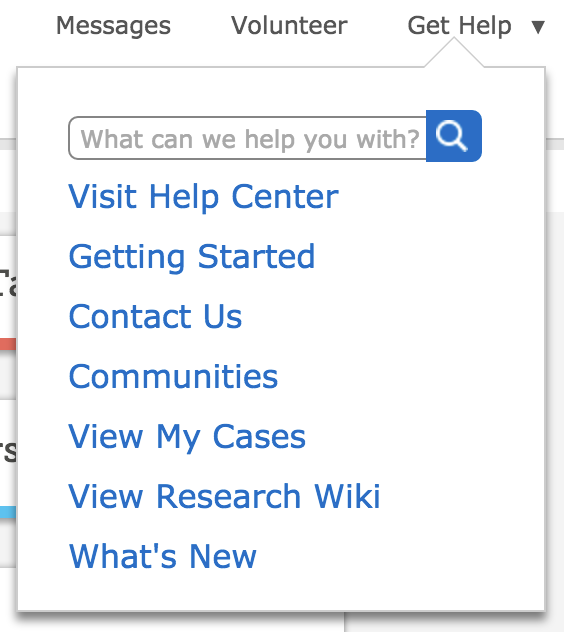
One of the options under the newly redesigned "Get Help" link on the FamilySearch.org startup page is the What's New. In the past, this feature was not particularly up-to-date, but now it seems to be more extensive and helpful. Here is a screenshot of the Get Help menu showing the link.


In fact, the main new feature discussed for October, 2016 is the redesign of the Help Center. The article on the changes contains the following explanation:
The FamilySearch Help Center has been improved to help you in your family history efforts:
  • The Get Help menu contains fewer options.
  • You can now search for help content directly from the Get Help menu.
  • Searches now include the Learning Center, research wiki, and knowledge articles. You previously had to search each resource separately.
  • Within the Learning Center (which contains video, presentations, and other training-type content), you can now see related courses organized into a series.
One of the "fewer options" is the lack of any links to the Learning Center or any other resources on the website. Once you get to the Help Center, you get a search field with no other links. If you search for the Learning Center, with all its instructional videos, you might find the following explanation.
The almost 800 videos and lessons from the Learning Center are in process of being transferred from the old to the new Learning Center. We appreciate your patience if a lesson that you need is temporarily unavailable.
So apparently, the Learning Center has disappeared for a while. I was able to find links to some of the videos, but the links to the Learning Center seem to take me to the Help Center search. I will write about the new Learning Center when it appears.

From the rest of the What's New for October, 2016 document, it looks like the 2 year expiration date for reserved Temple ordinances may begin to be enforced. There may be quite a few green temple icons that show up in the next month or so.


Wednesday, November 2, 2016

New Videos Uploaded from BYU Family History Library


Answers Hiding in Plain Sight: Using What You Know to Discover What You Don't Know - Kathryn Grant


Canadian Resources by Joyce Whiting


Understanding the Data in FamilySearch Family Tree - Kathryn Grant


Using First Level Genealogical Sources - James Tanner

We have a lot more coming in the weeks ahead. You can subscribe to the BYU Family History Library Channel by clicking on the subscribe link on the webpage for the Channel. Here is a screenshot with an arrow pointing to the link.


We are always open to suggestions for topics of new videos. Leave a comment on this post or send me an email with your suggestions. The BYU Family History Library Classes and Webinars page has links to all the videos and calendars showing the classes and webinars that are planned. We have ten webinars planned for November, 2016 and I have already recorded one of those planned so nine more to go.


Be sure and share this information with others. Thanks for watching.


Tuesday, November 1, 2016

Interest in FamilySearch greater outside of United States

Every so often, I get interested in comparing the relative popularity of search terms, especially those terms dealing with genealogy. In going once again to Google Trends, I found a very interesting trend about FamilySearch. The term "FamilySearch" is more heavily searched for in countries outside of the United States than here in the United States. Here is a screenshot showing the top five countries for searches.


New Zealand takes the top position for searches for FamilySearch followed by the U.K., Denmark, Australia and Ireland. If I look at the cities where FamilySearch is popular, Provo, Utah takes first place.


I guess I am doing my part to search for FamilySearch here in Provo. Interestingly, if you change the searches to FamilySearch.org, then the interest focus changes and Ireland moves to the number one position and the U.S. appears at number 4 bumping off Denmark.


However, if you look at just the last 12 months, the interest level changes dramatically.


Interest is centered in the United States and happens to be peaking at about the time this post was written.

For comparison, here is the graph for both the terms, "FamilySearch" and "Ancestry." Of course, the word "ancestry" is a generic term, so the comparison is not very accurate.


Comparing the searches for the two websites, Ancestry.com has the clear lead.


Over time, since 2004, "Ancestry" shows a consistent growth, while "FamilySearch" is relatively flat. My guess is that constant advertising actually works to increase awareness and probably use of the website.


One major flaw in looking at Google Trends is that it is dependent on searches and for example, I don't ever search for FamilySearch or Ancestry. I know exactly where the websites are located and I my browser will go to either one by typing one letter. So frequent users are "filtered" out by their frequency.

Whenever I go to Google Trends for data, I always get comments about how inaccurate it all is. Yes, that is probably a valuable criticism, but no one else has the amount of data that is accumulated by Google and the search trends are search trends, not actual numbers so even though actual use statistics might show growth for the websites' usage, the trends show overall interest in a unique way. One interesting question to ask is how many people who searched for Ancestry were actually looking for FamilySearch?